


Kodak Pro Image 100 Review! Now available in the USA!
Today, I review Kodak’s Kodak Pro Image 100 film! This film is now shipping from US distributors! Read more!

Kodak Pro image 100
Review and Film Scans
In 2018 it was recommended that I try a Kodak stock that I had never heard of, Kodak Pro Image 100! The only caveat was that it was available only in Europe. No big deal, however, as there were numerous eBay sellers shipping internationally. So, I had placed my first order for a new, inexpensive “Pro” stock to try out.
I had done a bit of research on this stock prior and had come across a few stunningly warm and vibrant images on Instagram. Needless to say, I was excited for what was in store.
Warner Brothers Studios backlot, LA
Contax T3
Kodak Pro Image 100
Warner Brothers Studios backlot, LA
Contax T3
Kodak Pro Image 100
THE EXPERIENCE:
Kodak Pro Image 100 is a very fine grain stock, and I was excited to try something that was a step up from the Kodak Gold lines. I don’t really haven’t found any real negatives about this film other than wishing that Kodak had released an ASA 400 version for a bit more flexibility. ASA 100 is pretty limiting once the sun drops below the horizon, but for everything else during the day it’s a wonderful replacement to Kodak Golds 100, 200, and 400 stock.
Cahuenga Blvd, Los Angeles, CA.
Contax T3
Kodak Pro Image 100
SHOOTING KODAK PRO IMAGE 100:
One of the most frequently asked questions with film stocks is how the film handles overexposure or underexposure. This is one area that Pro Image 100 is a bit sensitive. This stock doesn’t like too much overexposure nor underexposure. I’ve found that rating the film at box speed (ASA 100) will yield you the best results in terms of color and tonality balance. When overexposed, the highlights and whites seem to burn out and break at least a few stops shorter than the Portra 400 and Fuji 400H stocks. Underexposure will, of course, lift grain levels and shots are very difficult to recover during scanning. These are the ONLY negatives that I’ve experienced shooting and scanning Kodak’s Pro Image 100 stock. Otherwise, it’s a fantastic film for professional, casual, and travel work. More below…
Morrison St, North Hollywood, CA
Contax T3
Kodak Pro Image 100
Morrison St, North Hollywood, CA
Contax T3
Kodak Pro Image 100
Malibu, CA
Contax T3
Kodak Pro Image 100
FIRST SCANS:
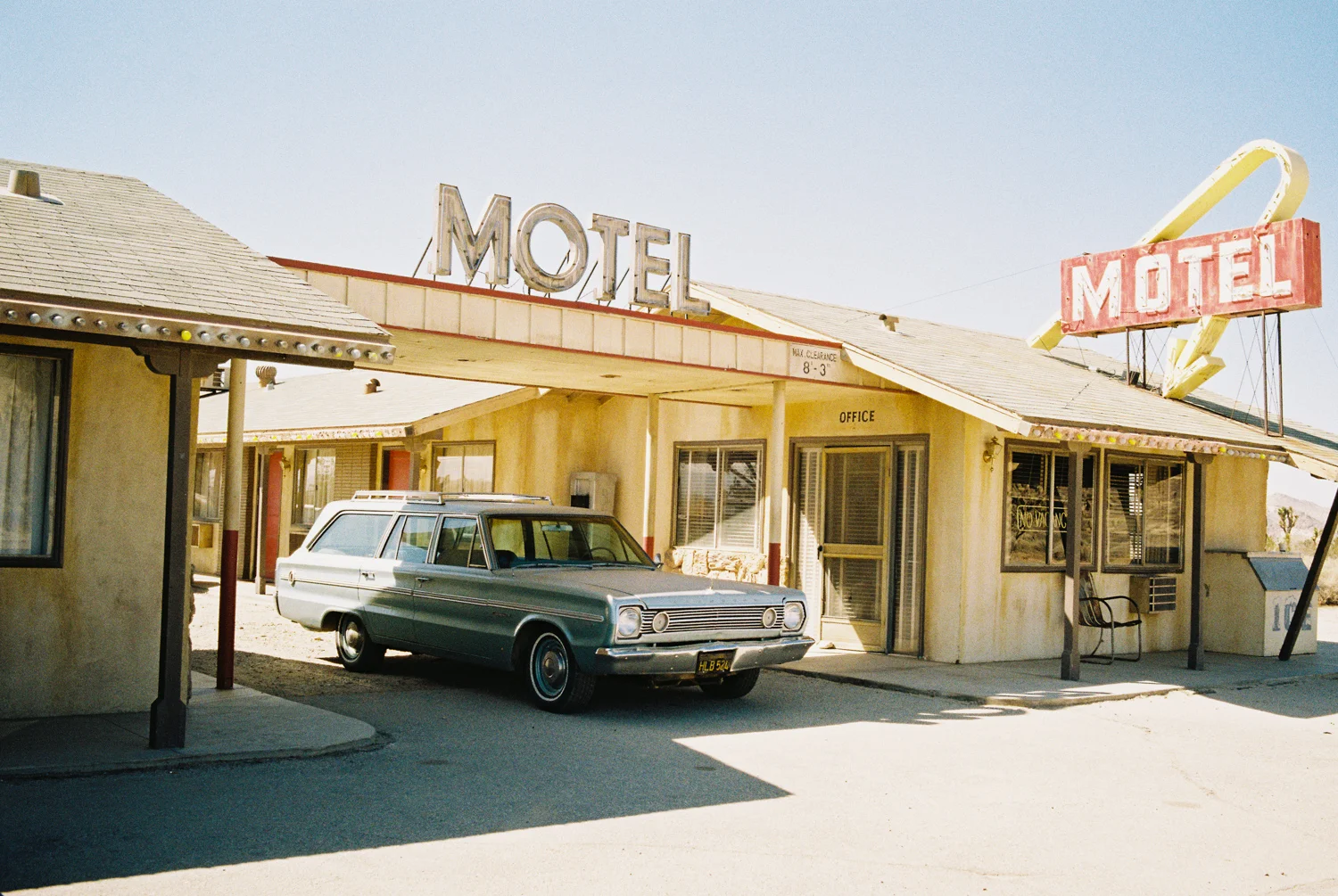
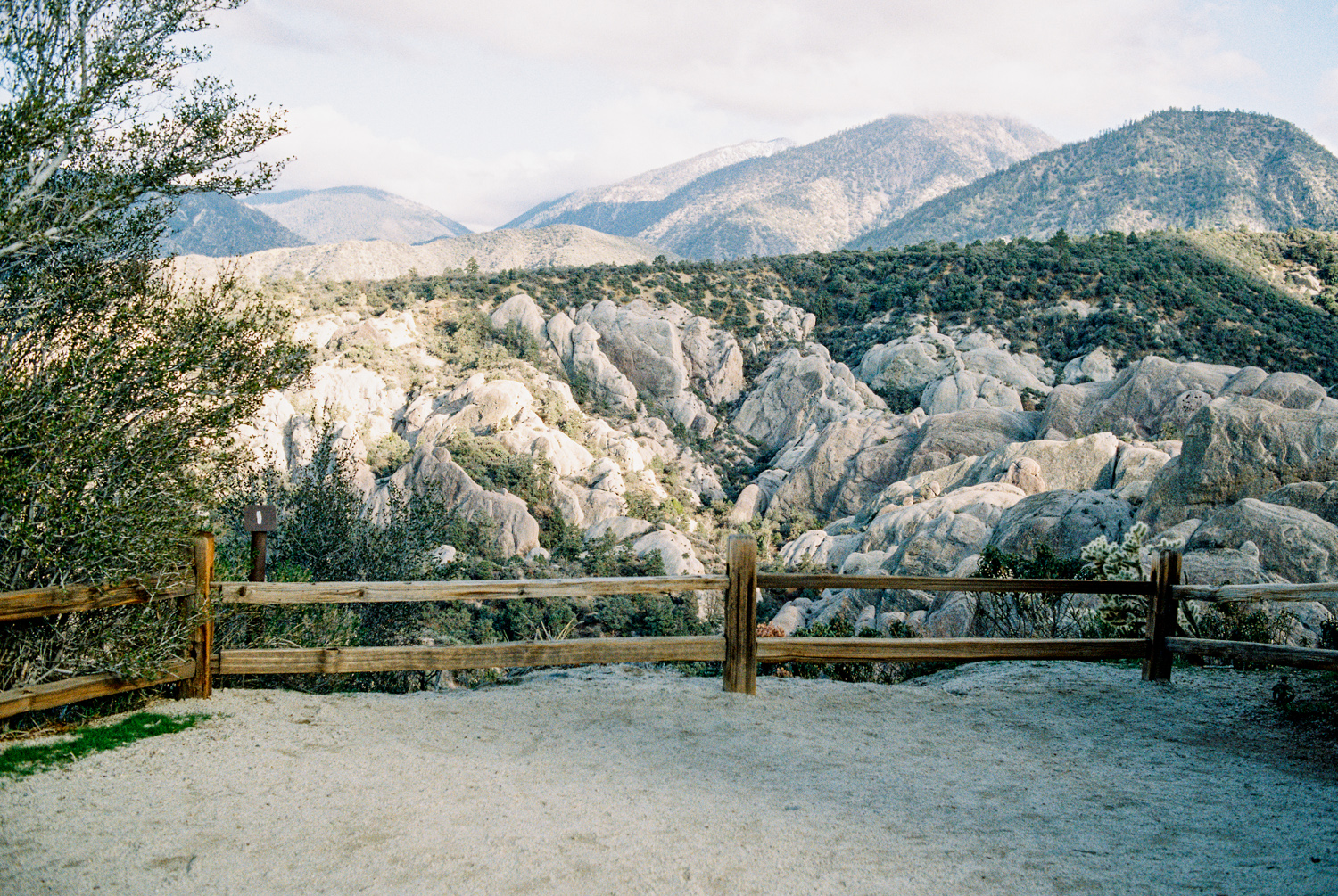
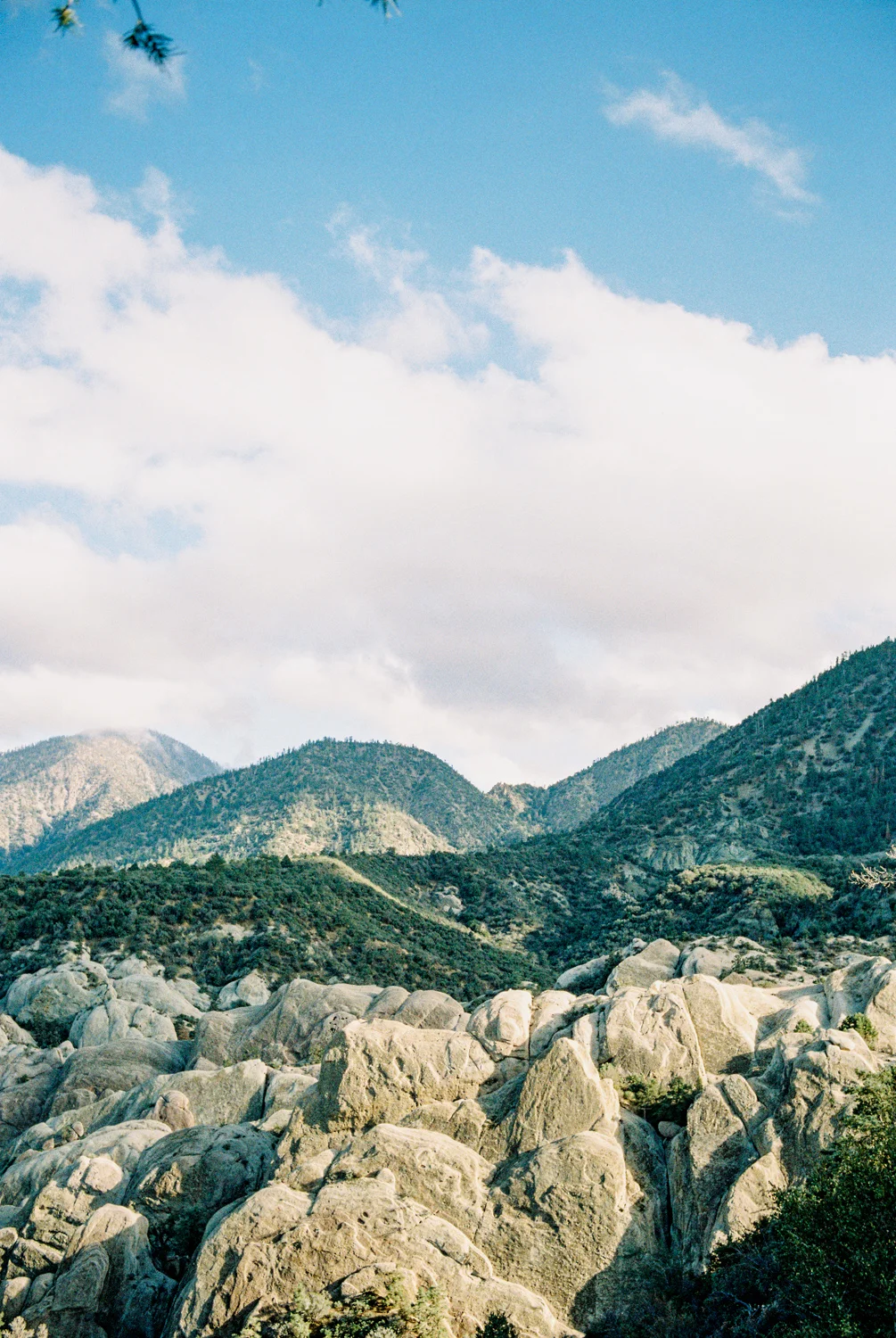
WOW! I’m actually very happy with the results! Kodak Pro Image 100 looks as if it could be the love child between Kodak and Fuji. It adapted Kodak’s warmer looks but with the pastel tones of Fuji’s 400H stock! The stock has taken the best looks about both film manufacturers, and it’s final result is great to admire. Sharp detail and grain seem to play very well for an inexpensive “Pro” film stock. Be sure to expand the images to view them larger.
Cali Deserts
Hexar AF
Kodak Pro Image 100
Cali Deserts
Hexar AF
Kodak Pro Image 100
Cali Deserts
Hexar AF
Kodak Pro Image 100
Cali Deserts
Hexar AF
Kodak Pro Image 100
CONCLUSION:
Kodak Pro Image 100 is likely to be my ongoing travel film of choice. It’s inexpensive, it’s clean, the colors are wonderful, and it’s readily available in the US from B&H Photo for $27.99 USD as of this posting. That’s a big win for us C41 shooters looking to save money but still find quality results from our negatives. So be sure to pick up a pro pack and enjoy the rest of your summer shooting this wonderful stock!
Devil’s Punchbowl, California
Hexar AF
Kodak Pro Image 100
Devil’s Punchbowl, California
Hexar AF
Kodak Pro Image 100
Devil’s Punchbowl, California
Hexar AF
Kodak Pro Image 100
Devil’s Punchbowl, California
Hexar AF
Kodak Pro Image 100

Hexar AF - Review
The Hexar AF is an interest-piquing rangefinder that seems to make waves in the film shooter community from time to time. I first learned about this camera in mid 2017 as I stumbled across a few frames posted online and Instagram. The image that the 35mm F/2.0 lens renders seemed to deliver solid sharpness, smooth contrast, and plenty of room for light to shine through.

Konica Hexar AF
Hexar AF Review
The Hexar AF is an interest-piquing rangefinder that seems to make waves in the film shooter community from time to time. I first learned about this camera in mid 2017 as I stumbled across a few frames posted online and Instagram. The image that the 35mm F/2.0 lens renders seemed to deliver solid sharpness, smooth contrast, and plenty of room for light to shine through. Through my browsing of forums, Flickr, and film blogs, some had mentioned that it was just as good, if not better, than the Contax G series and it's range of Zeiss glass. In a couple of other blogs, it was mentioned that it even rivaled Leica's 35mm F/2 Summicron lens. Full disclosure: I have not shot with either the Contax G series or Leica rangefinders so I cannot directly compare for myself. My next biggest attraction to it was it's price point, coming in at a fraction of the cost of the Contax G2 and Leica rangefinders, so I had to hunt one down to try out.
GEAR:
Hexar AF (Black)
35mm F/2.0
Kodak Pro Image 100
Fuji Frontier SP3000 Scanner
EXPERIENCE:
The camera has a standard rangefinder shape to it; grip-able, boxy, and easy to hold. At first glance, it definitely doesn't seem like it offers much more than it's "Hexa" or six total features (shooting modes, aperture, shutter speed, self-timer, exposure compensation, and manual focus), but the more that I looked into it I was surprised to find out that it delivers a list of features beyond the six standard. Besides the 35mm F2 lens, the most impressive feature to me was its silent shutter, or "stealth" mode – a feature that the original and black Hexar AF came with. However, due to some sort of patent or copyright infringement, this feature was removed... or was it? Come to find out, Konica's engineers implemented the "stealth" mode even into the the later versions. This mode couldn't easily be accessed though. The later versions of the Hexar AF required a specific order of buttons to be pressed before silent mode could be activated (read here). A strange drawback of this camera, however, is its very limiting 1/250 shutter speed limit. So be sure to consider using lower speed films if shooting in bright day light. If you're a studio shooter using PocketWizards this limitation won't be an issue for you. As for some of the other features, I'll break out a few of those below.
FEATURES:
STEALTH MODE: With the original and Black Hexar AF, press and hold the MF button and turn on the camera to any of the P, A, or M modes. Wait for the "L" to appear on the small LCD screen. "Shhhhhh." Stealth mode is now engaged. It remains in this mode until the camera is powered off, then you'll want to repeat the process again if you need to reengage this mode. For later models of the Hexar AF (Rhodium Edition, The Gold Edition, The Titanium Edition, and The Silver Edition), follow the instructions found on this page to enable "stealth" mode. It's so silent that I often find myself second-guessing whether the shutter was fired or not. For street photography this seals the deal for some of you.
MANUAL FILM SPEED CONTROL: The Hexar AF must be in A mode for this feature to work. Hold down the select button until the ISO range number appears. Using the + and - buttons, set your preferred ISO speed against the stock you've actually got loaded. A handy feature in any film camera is the ability to control the ISO setting at which the meter bases it's exposure. For example, if you prefer to err to the side of overexposure with ISO 400 film like Kodak Portra 400, you will want to set the camera's ISO setting to 200. This tells the meter that there is actually a lower speed or "darker" film loaded so it will need to compensate 1 stop overall, hence overexposing the ISO 400 film by one stop. This concept took me a while to grasp but it makes complete sense when you draw it out on paper.
4 OR 15 DEGREE SPOT METER: In "M" mode, the Hexar AF meter will utilize a 4 degree center-weighted area. In "P" and "A" modes, the Hexar AF will use a 15 degree center-weighted area. Especially useful if you're shooting with tricky lighting and require more manual control with exposure.
MANUAL FOCUS (SORT OF): The Hexar AF features a way to set your focus manually but it is sluggish and requires time to achieve. Half-way press down the shutter button to find the focus distance between the lens and subject, then press the MF button to lock focus to that distance. The LCD screen will display the distance that the lens is set to. To release the lens from manual focus, simply press the MF button again.
CONCLUSION: While I am still putting the Hexar AF through various scenarios, I can say that I am impressed. It's a solid camera for the shooter who simply likes to go out and make beautiful images. However, part of me has been struggling to truly enjoy shooting with it, but the other part of me feels like it has some sort of great potential that I haven't been able to fully find out. I will certainly update this posting as my time with the Hexar AF moves forward. It's a great camera with some handy features and a unique look to the images that it creates. I feel that it's worth getting your hands on one to try out at least once.
Check out this frame by @justcallmeloz. A good portion of his IG has been shot with a Hexar AF.
Also, see this frame and this frame by @Steve Broadbank, another talented film shooter.






Sources:
https://www.filmshooterscollective.com/analog-film-photography-blog/konica-hexar-a-stealth-camera-for-special-ops-alexander-m-sandy-noble-10-17
https://www.cameraquest.com/konhex.htm
https://www.johanniels.com/index.php/camera-gear-articles/27-konica-hexar-af-the-ultimate-compact-camera
https://www.japancamerahunter.com/2011/09/the-konica-hexar-af-the-quietest-camera-in-the-world/

Contax T3 - Review
The perfect point and shoot camera? Maybe so... Or maybe not. It's all relative, anyway. It's an age-old argument that has been discussed for decades. As most shooters know, beauty is in the eye of the beholder and that's exactly how I hope to approach shooting with different film cameras.

CONTAX T3
The perfect point and shoot camera? Maybe so... Or maybe not. It's all subjective, anyway.
It's an age-old argument that has been discussed for decades. As most shooters know, beauty is in the eye of the beholder and that's exactly how I hope to approach shooting with different film cameras. I'll be the first to admit that I am a sucker for Contax bodies as there is certainly a signature look that they achieve. Most of that look lends thanks to the T* coated lens lineup. I'd like to discuss my thoughts on shooting with a Contax T3 and how I feel it compares to a close contender, the Olympus Stylus Epic.
GEAR:
Contax T3 (Black)
35mm F/2.8 Zeiss T* lens
Kodak Pro Image 100
Fuji Frontier SP3000 Scanner
GENERAL:
I picked up my T3 from a seller I found on Instagram. As with most T3s, at some point in their lifespan, this one needed a new film take-up spool to be installed. Unfortunately, they are built with a plastic spool that has a single tooth that wears down with usage and eventually renders the body useless until repaired. I had the camera sent to Nippon Photo Clinic; one week and a $250 parts-and-labor repair later, I had a perfectly functioning T3. Time to shoot!
Contax T3 + Portra 160
Contax T3 + Portra 160
THE EXPERIENCE:
Holding the camera feels great. It feels well-built, solid, and easy to use. It is definitely a body that I want to protect from scratches or markups of any kind so I was happy to have purchased it with a neck strap that wraps the camera in a leather half-case holder. Shooting with it is about as straight forward as you'd want a point and shoot to be. Flip the switch to "P" mode and take your shot. Simple is great for a small camera like this. Another aspect that I really appreciate about this camera is it's manual control. If I see a shot that could use certain depth of field, or a subject to be metered darker or lighter, I have that ability. Lock in the lens at F/2.8 and you've almost obtained total control over your portrait session. The one thing stopping that is its shutter speed is still counter measuring against the F-stop setting you are using. The best way to get around this is to utilize the T3's exposure compensation feature. To understand more about exposure compensation, it's very handy to learn about the F-stop range on the aperture scale, lighting ratios, and metering. This, of course, develops along with your shooting style over time.
FOCUSING:
Keep in mind that there is no easy, efficient way of seeing exactly where the T3 will be focused (more on this in a bit) so be sure to lock in on your subject or point-of-interest at the center of the frame. I'd say that around 80-90% of my quick shots were in proper focus. No focus system is perfect, especially with the older technology in most of these cameras. At a half-press of the shutter, the T3's display will show the distance that the lens is focused and ready to release. If you're skilled in US-to-metric conversions, this should be easy enough to understand – lucky you! For others, it may not make much sense to know how far 5 meters is, and by then the moment may be lost. If you're locked in place and anticipate the distance of a subject, say on a fashion runway or walkabout street-style scene, you can program the T3 lens to focus at varying focal lengths – which is handy, but a time consumer to switch back and forth when you need to. In the end, this is still just a point-and-shoot experience, so you're generally expected to shoot it as such.
Contax T3 +Kodak Pro Image 100
Contax T3 +Kodak Pro Image 100
VS OLYMPUS STYLUS EPIC/MJU
Prior to owning and shooting with the T3, I had been using an Olympus Stylus Epic DLX (gold and black versions) for a few years. Both cameras produced tack sharp images that compare very similarly to the T3. The major difference, for me, is the color rendition. There's always something to be said about Zeiss glass, but that's not to say the Stylus Epic renders poor color. It actually renders out fantastic color, and it works for the majority of scenes that I've shot it with. Maybe it's the placebo effect, but I feel that the T3's overall image is more consistent, smoother, and "perfect" in detail, color, and resolution. I don't have a single issue taking the Stylus Epic through dirty situations, whereas I feel that I need to treat the T3 like a nice pair of boots or luxury car. I hate to see it dirty or suffer through a dust storm – it's just too nice (and expensive) of a body to risk having it damaged. Both cameras are top choices for me but the Stylus Epic falls behind in a very close second.
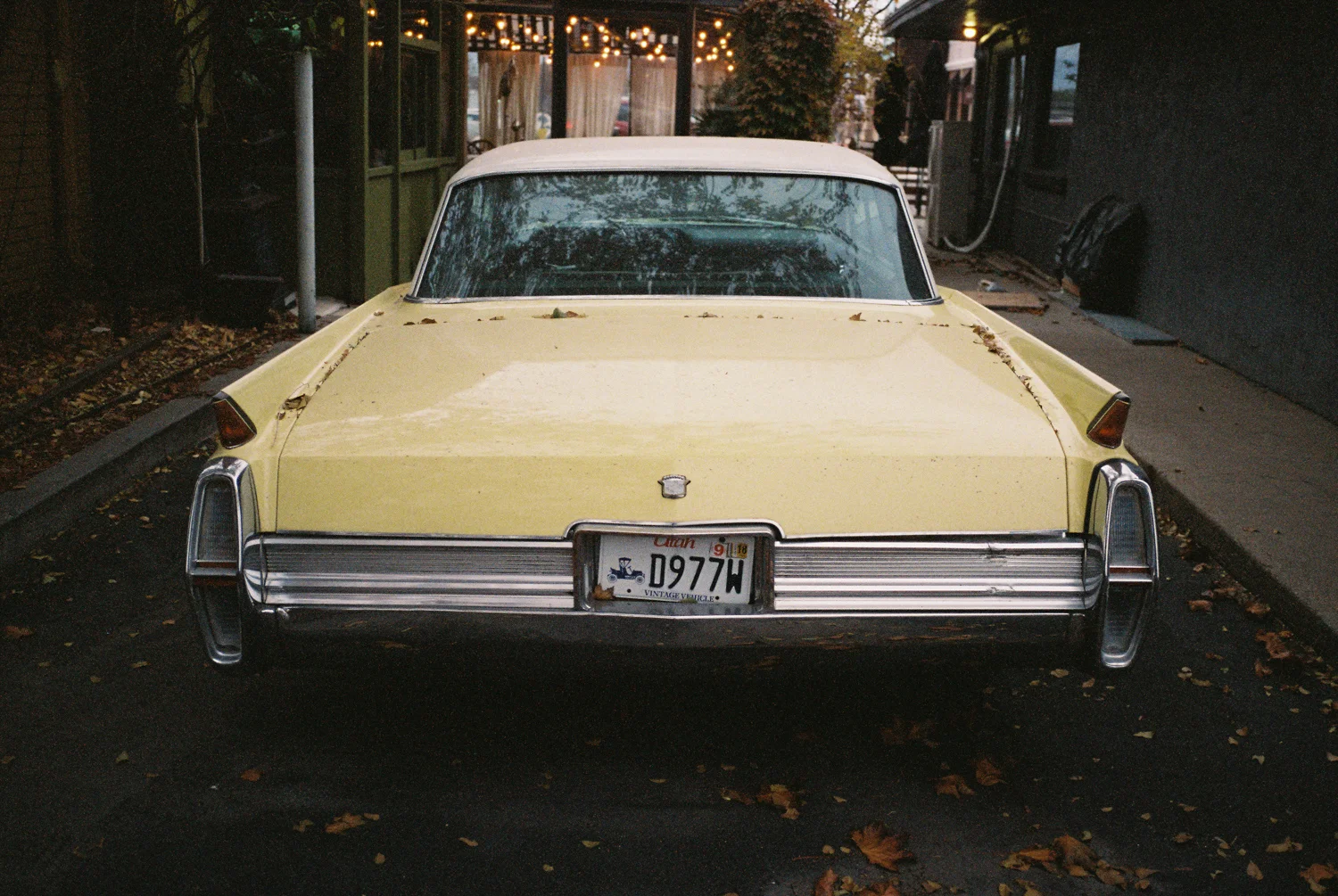
Contax T3 + Pro Image 100
Stylus Epic + Pro Image 100







Search Posts
-
2018
- Mar 31, 2018 Contax T3 - Review
- Apr 20, 2018 Hexar AF - Review
- Sep 9, 2018 Olympus Stylus Epic vs Contax T3
-
2019
- Jan 9, 2019 Julbo Eyewear
- May 15, 2019 Pentax 6x7 MLU
- May 15, 2019 Fuji XT20 - Review
- Jun 15, 2019 London on Film
- Jul 22, 2019 Kodak Pro Image 100 Review! Now available in the USA!
- 2020